 Qualcomm API Documentation
Guardian Management Tool API Guide
Overview
The Snapdragon Guardian API provides a unified set of APIs for executing commands on devices and retrieving device details.
- Commands can be sent to devices, with responses returned either asynchronously (to account for cases where the device may be offline) or from cached data when available.
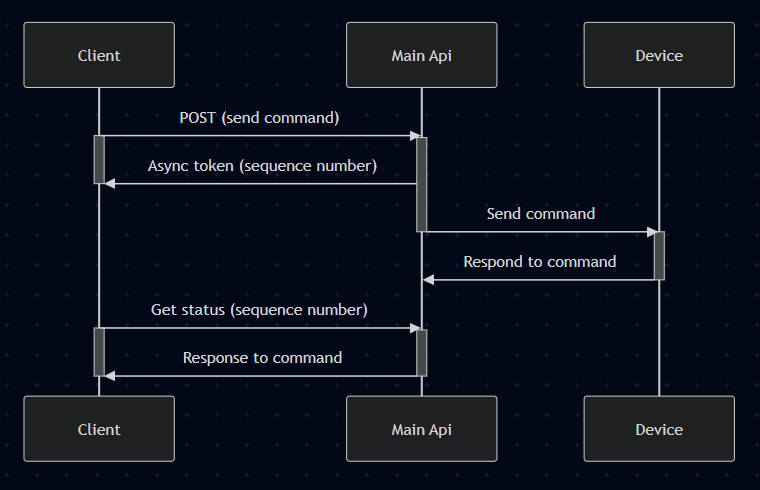
- Device information is accessible through synchronous API calls, which return stored data without requiring direct communication with the device.
Authentication: All endpoints require authentication headers (see Deployment Package for token setup).
Quick Start: Common API requests
- List Devices →
GET /devices - Get details of a device →
GET /devices/{deviceId} - Send a command to the device →
POST /devices/{deviceId}/command - Get the status of a command →
GET /devices/{deviceId}/command/{sequence} - Get command history →
GET /devices/{deviceId}/commands - Get event history →
GET /events - Get details of an event →
GET /events/{eventId}
Endpoints
1. List Devices
Gets a paginated list of devices, allowing filtering or sorting
Request:
GET /devices?pageNum=0&pageSize=2Response (200):
{
  "page": 0,
  "pageSize": 2,
  "total": 35,
  "results": [
    {
      "id": "eceb637f-821b-4bfd-9087-865d261155a7",
      "name": "Device_A",
      "serialNumber": "WVL25432705",
      "qwesId": "Device_A",
      "publicKeyId": "0ce6be32-1984-4991-add4-f6888b44109b",
      "model": {
        "id": 6,
        "mcn": "testQdragonX",
        "mcnRevision": "TBD",
        "manufacturer": "Qualcomm",
        "formFactor": "string"
      },
      "manufacturedDate": "2025-10-14",
      "inventoryState": "ONBOARDED",
      "serviceState": "READY",
      "lastHeartbeatTime": "2025-11-13T17:43:01.617Z",
      "deviceIdentifiers": [
        {
          "id": 816,
          "value": "DEVICE_A",
          "deviceIdentifierType": {
            "id": 9,
            "name": "assetTag"
          }
        }
      ],
      "externalIdentifier": "Device_A"
    },
    {
      "id": "3e3df1ba-afca-4312-abcd-bf6c55b64de7",
      "name": "QCOM-LVKLAN4NP4",
      "serialNumber": "WHS49747680",
      "qwesId": "DeviceId3",
      "publicKeyId": "0ce6be32-1984-4991-add4-f6888b44109b",
      "model": {
        "id": 6,
        "mcn": "testQdragonX",
        "mcnRevision": "TBD",
        "manufacturer": "Qualcomm",
        "formFactor": "string"
      },
      "manufacturedDate": "2025-10-10",
      "inventoryState": "ONBOARDED",
      "serviceState": "READY",
      "lastHeartbeatTime": "2025-11-24T08:50:47.143Z",
      "deviceIdentifiers": [
        {
          "id": 392,
          "value": "DEVICEID3",
          "deviceIdentifierType": {
            "id": 9,
            "name": "assetTag"
          }
        }
      ],
      "externalIdentifier": "DeviceId3"
    }
  ]
}
2. Get details of a device
Get the details of a specific device
Request:
GET /devices/eceb637f-821b-4bfd-9087-865d261155a7?expand=deviceMetricsInfo%2CdeviceConfigurationsInfoResponse (200):
{
  "id": "eceb637f-821b-4bfd-9087-865d261155a7",
  "name": "Device_G",
  "serialNumber": "WVL25432705",
  "qwesId": "Device_G",
  "publicKeyId": "0ce6be32-1984-4991-add4-f6888b44109b",
  "tenancyChangeTime": "2025-10-14T17:24:17.665697Z",
  "model": {
    "id": 6,
    "mcn": "testQdragonX",
    "mcnRevision": "TBD",
    "manufacturer": "Qualcomm",
    "formFactor": "string"
  },
  "configurations": [
    {
      "id": 8,
      "name": "isNativeMCN",
      "value": "true",
      "category": "MCN"
    },
    {
      "id": 1228,
      "name": "operatingSystem",
      "value": "Windows 11 Enterprise",
      "category": "device"
    },
    {
      "id": 30,
      "name": "processorModel",
      "value": "Pegasus",
      "category": "device"
    },
    {
      "id": 26,
      "name": "partNumber",
      "value": "89324",
      "category": "device"
    },
    {
      "id": 28,
      "name": "totalSystemMemoryGiB",
      "value": "32",
      "category": "device"
    },
    {
      "id": 27,
      "name": "sku",
      "value": "AA",
      "category": "device"
    },
    {
      "id": 29,
      "name": "processorCount",
      "value": "8",
      "category": "device"
    }
  ],
  "manufacturedDate": "2025-10-14",
  "inventoryState": "ONBOARDED",
  "serviceState": "READY",
  "lastHeartbeatTime": "2025-11-13T17:43:01.617Z",
  "deviceIdentifiers": [
    {
      "id": 816,
      "value": "DEVICE_G",
      "deviceIdentifierType": {
        "id": 9,
        "name": "assetTag"
      }
    }
  ],
  "metricsInfo": {
    "metrics": [
      {
        "name": "Location",
        "value": "{\"location\":{\"lat\":32.899292,\"lng\":-117.191772},\"accuracy\":204,\"source\":\"rfpm\",\"streetAddress\":{\"distanceToPoint\":63.238845,\"streetNumber\":\"10001\",\"addressLine\":\"Pacific Mesa Blvd\",\"metro1\":\"San Diego\",\"postalCode\":\"92121\",\"county\":\"San Diego\",\"stateCode\":\"CA\",\"stateName\":\"California\",\"countryCode\":\"US\",\"countryName\":\"United States\"}}",
        "lastUpdatedTime": "2025-11-05T09:08:41.101Z"
      },
      {
        "name": "City",
        "value": "San Diego",
        "lastUpdatedTime": "2025-11-05T09:08:41.101Z"
      },
      {
        "name": "lockState",
        "value": "Unlocked",
        "lastUpdatedTime": "2025-11-13T17:43:01.617Z"
      },
      {
        "name": "powerState",
        "value": "On",
        "lastUpdatedTime": "2025-11-13T17:43:01.617Z"
      },
      {
        "name": "systemState",
        "value": "Enabled",
        "lastUpdatedTime": "2025-11-13T17:43:01.617Z"
      },
      {
        "name": "systemHealth",
        "value": "OK",
        "lastUpdatedTime": "2025-11-13T17:43:01.617Z"
      }
    ],
    "serviceState": "READY",
    "heartbeatTime": "2025-11-13T17:43:01.617Z"
  },
  "externalIdentifier": "Device_G"
}
3. Send a command to the device
Send a command to the device. This request receives sequenceNumber as a response, which can be used to get the status of the command
Request:
POST /devices/Device_G/command/systemInfoResponse (200):
{
  "deviceId": "Device_G",
  "sequenceNumber": 8006,
  "requestType": "SYSTEM_INFO",
  "requestStatus": "PENDING",
  "message": "Command to perform SYSTEM_INFO initiated.",
  "createdAt": "2025-11-26T01:05:44.2493195+00:00"
}
A generic API is available to send commands to a device by specifying the desired operation in the requestType field.
Request:
POST /devices/Device_G/commands?requestType=LOCATIONCheck Device Request Types section for more details on each requestType and its response.
4. Get the status of a command
Get the status of a command. If the command is COMPLETE, the response will also contain the resultBody.
Request:
GET /devices/Device_G/command/8006Response (200):
{
  "deviceId": "Device_G",
  "sequenceNumber": 8006,
  "requestStatus": "COMPLETE",
  "completedAt": "2025-11-26T01:05:45.481521+00:00",
  "createdAt": "2025-11-26T01:05:44.249319+00:00",
  "requestType": "SYSTEM_INFO",
  "requestBody": null,
  "resultBody": {
    "Oem": {
      "Qualcomm": {
        "Locked": false,
        "@odata.type": "#Qualcomm.ComputerSystem"
      }
    },
    "SKU": "AA",
    "Model": "X2000094",
    "Status": {
      "State": "Enabled",
      "Health": "OK"
    },
    "Actions": {
      "Oem": {
        "#Qualcomm_ComputerSystem.Lock": {
          "target": "/redfish/v1/Systems/0/Actions/Oem/Qualcomm_ComputerSystem.Lock"
        },
        "#Qualcomm_ComputerSystem.Locate": {
          "target": "/redfish/v1/Systems/0/Actions/Oem/Qualcomm_ComputerSystem.Locate"
        }
      },
      "#ComputerSystem.Reset": {
        "target": "/redfish/v1/Systems/0/Actions/ComputeSystem.Reset"
      }
    },
    "AssetTag": "DEVICE_G",
    "HostName": "Device_G",
    "PartNumber": "89324",
    "PowerState": "On",
    "Manufacturer": "Qualcomm",
    "SerialNumber": "2302-1324-ab25",
    "MemorySummary": {
      "TotalSystemMemoryGiB": 32
    },
    "ProcessorSummary": {
      "Count": 8,
      "Model": "Pegasus"
    }
  }
}
5. Get command history
Get a recent history of all commands run on the device. This can be helpful if sequence number is lost, or to get the most recent result for a given command request type.
By default, Snapdragon Guardian will only retain the most recent 100 commands. This can be configured by updating the MAX_COMMANDS_PER_DEVICE in the infrastructure package.
Request:
GET /devices/Device_G/commands?sort=sequenceNumber%2Cdesc&page=0&pageSize=2Response (200):
{
  "page": 0,
  "pageSize": 2,
  "total": 71,
  "results": [
    {
      "sequenceNumber": 8006,
      "deviceId": "Device_G",
      "requestStatus": "COMPLETE",
      "requestType": "SYSTEM_INFO",
      "statusCode": 0,
      "createdAt": "2025-11-26T01:05:44.249319+00:00",
      "acceptedAt": null,
      "completedAt": "2025-11-26T01:05:45.481521+00:00",
      "commandType": "REDFISH"
    },
    {
      "sequenceNumber": 8004,
      "deviceId": "Device_G",
      "requestStatus": "COMPLETE",
      "requestType": "BIOS",
      "statusCode": 0,
      "createdAt": "2025-11-26T01:03:57.84191+00:00",
      "acceptedAt": null,
      "completedAt": "2025-11-26T01:04:00.011442+00:00",
      "commandType": "REDFISH"
    }
  ]
}
6. Get event history
The device may generate events to notify the user on certain conditions. These are stored in a history log, and additional details can be retrieved for desired events.
Request:
GET /events?pageSize=2&page=0&deviceId=Device_G&sort=receivedAt,descResponse (200):
{
  "page": 0,
  "pageSize": 2,
  "total": 26,
  "results": [
    {
      "id": 274,
      "eventId": 1,
      "deviceId": "Device_G",
      "messageId": "SensorEvent.1.0.ReadingAboveUpperCriticalThreshold",
      "name": "ReadingAboveUpperCriticalThreshold",
      "description": null,
      "registryPrefix": "SensorEvent",
      "registryVersion": "1.0",
      "severity": "Critical",
      "messages": null,
      "receivedAt": "2025-11-24T06:48:07.368245+00:00",
      "eventStatus": "SEEN"
    },
    {
      "id": 272,
      "eventId": 1,
      "deviceId": "Device_G",
      "messageId": "SensorEvent.1.0.ReadingAboveUpperCriticalThreshold",
      "name": "ReadingAboveUpperCriticalThreshold",
      "description": null,
      "registryPrefix": "SensorEvent",
      "registryVersion": "1.0",
      "severity": "Critical",
      "messages": null,
      "receivedAt": "2025-11-24T06:48:07.341182+00:00",
      "eventStatus": "SEEN"
    }
  ]
}
7. Get details of an event
Get additional details of a specific event
By default, Snapdragon Guardian will only retain the most recent 100 events. This can be configured by updating the MAX_EVENTS_PER_DEVICE in the infrastructure package.
Request:
GET /events/274Response (200):
{
  "id": 274,
  "eventId": 1,
  "deviceId": "Device_G",
  "messageId": "SensorEvent.1.0.ReadingAboveUpperCriticalThreshold",
  "name": "ReadingAboveUpperCriticalThreshold",
  "description": "",
  "registryPrefix": "SensorEvent",
  "registryVersion": "1.0",
  "severity": "Critical",
  "messages": "{\"EventId\":\"1\",\"EventTimestamp\":\"2025-11-24T06:47:48.0174128Z\",\"MessageId\":\"SensorEvent.1.0.ReadingAboveUpperCriticalThreshold\",\"MessageArgs\":[\"battery\",\"85\",\"degree C\",\"80\"],\"MessageSeverity\":\"Critical\",\"OriginOfCondition\":{\"@odata.id\":\"/redfish/v1/Chassis/0/PowerSubsystem/Batteries/0\"}}",
  "receivedAt": "2025-11-24T06:48:07.368245+00:00",
  "eventStatus": "SEEN"
}
Device Request Types
This section provides comprehensive examples of request bodies and response bodies for all supported device command request types.
- LOCATION
- OPAQUE
- LOCK
- RESET
- BIOS
- TASK_STATUS
- REGISTRY
- EVENT_SUBSCRIBE
- GET_EVENT_SUBSCRIPTIONS
- LOG_FILE
- BOOT_LOG_SERVICE
- SOFTWARE_INFO
- SYSTEM_INFO
- FIRMWARE
- SECURE_ERASE
- GET_EVENT_LOGS
- CLEAR_EVENT_LOGS
- BOOT_LOG_SERVICE_STATUS
- GET_BOOT_LOGS
- REIMAGE
LOCATION
Request Type: LOCATION
Request Body: None required
Request:
POST /devices/{deviceId}/commands?requestType=LOCATIONResponse (200):
{
  "Oem": {
    "Qualcomm": {
      "Bearing": 180,
      "SpeedMps": 10,
      "CellTowers": [
        {
          "CellId": 14037536,
          "Channel": 2325,
          "Serving": true,
          "RadioType": "lte",
          "Timestamp": 55691,
          "NeighborId": 110,
          "TimingAdvance": null,
          "SignalStrength": -120,
          "LocationAreaCode": 13826,
          "MobileCountryCode": 311,
          "MobileNetworkCode": 480
        },
        {
          "Channel": 2325,
          "Serving": false,
          "RadioType": "lte",
          "Timestamp": 55691,
          "NeighborId": 434,
          "SignalStrength": -123
        },
        {
          "Channel": 1000,
          "Serving": false,
          "RadioType": "lte",
          "Timestamp": 55691,
          "NeighborId": 434,
          "SignalStrength": -117
        }
      ],
      "AccuracyMeters": 2
    }
  },
  "Latitude": -117.19,
  "Longitude": 32.9,
  "@odata.type": "#Location.Location",
  "tpsResponse": {
    "source": "rfpm",
    "accuracy": 210,
    "location": {
      "lat": 32.901149,
      "lng": -117.19249
    },
    "streetAddress": {
      "county": "San Diego",
      "metro1": "San Diego",
      "stateCode": "CA",
      "stateName": "California",
      "postalCode": "92121",
      "addressLine": "Pacific Heights Blvd",
      "countryCode": "US",
      "countryName": "United States",
      "streetNumber": "10048",
      "distanceToPoint": 10.39355787
    }
  },
  "AltitudeMeters": 100.6
}
OPAQUE
Request Type: OPAQUE
Request Body: Required
Request:
POST /devices/{deviceId}/commands?requestType=OPAQUE
Content-Type: application/json

{
  "command": "custom-command-string"
}
Response (200):
"T3BhcXVlUmVzcG9uc2Uh"Note: Response is a Base64-encoded string
LOCK
Request Type: LOCK
Request Body: Required
Request:
POST /devices/{deviceId}/commands?requestType=LOCK
Content-Type: application/json

{
  "locked": true
}
Response (200):
{
  "locked": true,
  "status": "success"
}
RESET
Request Type: RESET
Request Body: Required
Request:
POST /devices/{deviceId}/commands?requestType=RESET
Content-Type: application/json

{
  "resetType": "GracefulRestart"
}
Available Reset Types:
GracefulRestartForceRestartGracefulShutdownForceShutdownPowerCycle
Response (200):
{
  "status": "accepted",
  "resetType": "GracefulRestart"
}
BIOS
Request Type: BIOS
Request Body: Required
Request 1: Get BIOS Info
POST /devices/{deviceId}/commands?requestType=BIOS
Content-Type: application/json

{
  "biosOperationType": "GET_INFO"
}
Request 2: Set Boot Option
POST /devices/{deviceId}/commands?requestType=BIOS
Content-Type: application/json

{
  "biosOperationType": "SET_BOOT_OPTION",
  "id": 1,
  "bootOptionEnabled": true,
  "bootOptionReference": "Boot0001"
}
Request 3: Update BIOS Settings
POST /devices/{deviceId}/commands?requestType=BIOS
Content-Type: application/json

{
  "biosOperationType": "UPDATE_SETTINGS",
  "attributes": {
    "SecureBoot": "Enabled",
    "BootMode": "UEFI"
  }
}
Available BIOS Operation Types:
GET_INFOSET_BOOT_OPTIONUPDATE_SETTINGS
Response (GET_INFO):
{
  "attributes": {
    "SecureBoot": "Enabled",
    "BootMode": "UEFI",
    "VirtualizationTechnology": "Enabled"
  },
  "bootOptions": [
    {
      "id": 1,
      "bootOptionEnabled": true,
      "bootOptionReference": "Boot0001",
      "displayName": "Windows Boot Manager"
    }
  ]
}
TASK_STATUS
Request Type: TASK_STATUS
Request Body: Required
Request:
POST /devices/{deviceId}/commands?requestType=TASK_STATUS
Content-Type: application/json

{
  "sequenceNumber": 12345
}
Response (200):
{
  "sequenceNumber": 12345,
  "status": "COMPLETE",
  "percentComplete": 100,
  "taskState": "Completed"
}
REGISTRY
Request Type: REGISTRY
Request Body: Required
Request:
POST /devices/{deviceId}/commands?requestType=REGISTRY
Content-Type: application/json

{
  "registryId": "registry-001"
}
Response (200):
{
  "registryId": "registry-001",
  "registryPrefix": "Base",
  "version": "1.0.0",
  "messages": []
}
EVENT_SUBSCRIBE
Request Type: EVENT_SUBSCRIBE
Request Body: Required
Request 1: Subscribe to Events
POST /devices/{deviceId}/commands?requestType=EVENT_SUBSCRIBE
Content-Type: application/json

{
  "action": "Subscribe",
  "registryPrefix": ["Base", "TaskEvent"],
  "resourceTypes": ["Task"],
  "severities": ["Critical", "Warning"],
  "deliveryRetryPolicy": "RetryForever",
  "context": "QRMS Event Subscription"
}
Request 2: Unsubscribe from Events
POST /devices/{deviceId}/commands?requestType=EVENT_SUBSCRIBE
Content-Type: application/json

{
  "action": "Unsubscribe"
}
Available Actions:
SubscribeUnsubscribe
Response (200):
{
  "Id": 2,
  "Status": {
    "State": "Enabled"
  }
}
GET_EVENT_SUBSCRIPTIONS
Request Type: GET_EVENT_SUBSCRIPTIONS
Request Body: None required
Request:
POST /devices/{deviceId}/commands?requestType=GET_EVENT_SUBSCRIPTIONSResponse (200):
{
  "Members": [
    {
      "@odata.id": "/redfish/v1/EventService/Subscriptions/1"
    },
    {
      "@odata.id": "/redfish/v1/EventService/Subscriptions/2"
    },
    {
      "@odata.id": "/redfish/v1/EventService/Subscriptions/3"
    }
  ],
  "Members@odata.count": 3
}
LOG_FILE
Request Type: LOG_FILE
Request Body: Required
Request:
POST /devices/{deviceId}/commands?requestType=LOG_FILE
Content-Type: application/json

{
  "uri": "/redfish/v1/Systems/System.Embedded.1/LogServices/Lclog/Entries"
}
Response (200):
{
  "logEntries": [
    {
      "entryType": "Event",
      "severity": "Warning",
      "message": "System boot completed",
      "created": "2026-01-27T12:00:00Z"
    }
  ]
}
BOOT_LOG_SERVICE
Request Type: BOOT_LOG_SERVICE
Request Body: Required
Request:
POST /devices/{deviceId}/commands?requestType=BOOT_LOG_SERVICE
Content-Type: application/json

{
  "serviceEnabled": true
}
Response (200):
{
  "ServiceEnabled": true
}
SOFTWARE_INFO
Request Type: SOFTWARE_INFO
Request Body: None required
Request:
POST /devices/{deviceId}/commands?requestType=SOFTWARE_INFOResponse (200):
{
  "Id": "OS",
  "Oem": {
    "Qualcomm": {
      "@odata.type": "#Qualcomm.SoftwareInventory",
      "InstallDate": ""
    }
  },
  "Name": "Windows 11 Enterprise",
  "Status": {
    "State": "Enabled",
    "Health": "OK"
  },
  "Version": "22H2",
  "SoftwareId": "",
  "Updateable": true,
  "ReleaseDate": "",
  "Manufacturer": "Microsoft",
  "VersionScheme": "OEM"
}
SYSTEM_INFO
Request Type: SYSTEM_INFO
Request Body: None required
Request:
POST /devices/{deviceId}/commands?requestType=SYSTEM_INFOResponse (200):
{
  "Id": "System.Embedded.1",
  "Name": "System",
  "SystemType": "Physical",
  "Manufacturer": "Dell Inc.",
  "Model": "PowerEdge R640",
  "SerialNumber": "ABC123XYZ",
  "BiosVersion": "2.10.0",
  "ProcessorSummary": {
    "Count": 2,
    "Model": "Intel(R) Xeon(R) Gold 6248R CPU @ 3.00GHz"
  },
  "MemorySummary": {
    "TotalSystemMemoryGiB": 384
  },
  "Status": {
    "State": "Enabled",
    "Health": "OK"
  }
}
FIRMWARE
Request Type: FIRMWARE
Request Body: None required
Request:
POST /devices/{deviceId}/commands?requestType=FIRMWAREResponse (200):
{
  "FirmwareInventory": [
    {
      "Id": "BMC",
      "Name": "Baseboard Management Controller",
      "Version": "4.40.40.40",
      "Updateable": true,
      "Status": {
        "State": "Enabled",
        "Health": "OK"
      }
    },
    {
      "Id": "BIOS",
      "Name": "System BIOS",
      "Version": "2.10.0",
      "Updateable": true,
      "Status": {
        "State": "Enabled",
        "Health": "OK"
      }
    }
  ]
}
SECURE_ERASE
Request Type: SECURE_ERASE
Request Body: None required
Request:
POST /devices/{deviceId}/commands?requestType=SECURE_ERASEResponse (200):
{
  "status": "accepted",
  "message": "Secure erase operation initiated"
}
GET_EVENT_LOGS
Request Type: GET_EVENT_LOGS
Request Body: None required
Request:
POST /devices/{deviceId}/commands?requestType=GET_EVENT_LOGSResponse (200):
{
  "Members": [
    {
      "Id": "1",
      "EntryType": "Event",
      "Severity": "Warning",
      "Message": "System temperature exceeded threshold",
      "Created": "2026-01-27T10:30:00Z"
    },
    {
      "Id": "2",
      "EntryType": "Event",
      "Severity": "OK",
      "Message": "System temperature returned to normal",
      "Created": "2026-01-27T10:35:00Z"
    }
  ],
  "Members@odata.count": 2
}
CLEAR_EVENT_LOGS
Request Type: CLEAR_EVENT_LOGS
Request Body: None required
Request:
POST /devices/{deviceId}/commands?requestType=CLEAR_EVENT_LOGSResponse (200):
{
  "status": "success",
  "message": "Event logs cleared successfully"
}
BOOT_LOG_SERVICE_STATUS
Request Type: BOOT_LOG_SERVICE_STATUS
Request Body: None required
Request:
POST /devices/{deviceId}/commands?requestType=BOOT_LOG_SERVICE_STATUSResponse (200):
{
  "ServiceEnabled": true,
  "Status": {
    "State": "Enabled",
    "Health": "OK"
  }
}
GET_BOOT_LOGS
Request Type: GET_BOOT_LOGS
Request Body: None required
Request:
POST /devices/{deviceId}/commands?requestType=GET_BOOT_LOGSResponse (200):
{
  "Members": [
    {
      "Id": "1",
      "EntryType": "Event",
      "Message": "System boot initiated",
      "Created": "2026-01-27T08:00:00Z"
    },
    {
      "Id": "2",
      "EntryType": "Event",
      "Message": "BIOS initialization complete",
      "Created": "2026-01-27T08:00:15Z"
    },
    {
      "Id": "3",
      "EntryType": "Event",
      "Message": "Operating system loading",
      "Created": "2026-01-27T08:00:30Z"
    }
  ],
  "Members@odata.count": 3
}
REIMAGE
Request Type: REIMAGE
Request Body: Required
Request:
POST /devices/{deviceId}/commands?requestType=REIMAGE
Content-Type: application/json

{
  "targets": ["BIOS", "BMC"],
  "imageURI": "https://example.com/firmware/update.bin",
  "applyTime": "Immediate"
}
Available Apply Times:
ImmediateOnResetAtMaintenanceWindowStart
Response (200):
{
  "taskId": "task-12345",
  "status": "accepted",
  "message": "Firmware update initiated",
  "targets": ["BIOS", "BMC"]
}
Notes
General Response Structure
All command responses follow this general structure when retrieved via the commands API:
{
  "sequenceNumber": 762,
  "deviceId": "s_dev2",
  "requestStatus": "COMPLETE",
  "requestType": "SOFTWARE_INFO",
  "statusCode": 0,
  "createdAt": "2026-01-27T11:59:35.072684+00:00",
  "acceptedAt": null,
  "completedAt": "2026-01-27T12:02:08.535772+00:00",
  "commandType": "REDFISH",
  "requestBody": null,
  "resultBody": {
    // Actual response data shown in examples above
  }
}
Request Status Values
PENDING- Command is queued and waiting to be processedQUEUEING_IN_PROGRESS- Command is being queuedCOMPLETE- Command completed successfullyFAILED- Command failed to execute
Retrieving Command Results
To retrieve command results with response bodies, use the includeResult=true query parameter:
GET /devices/{deviceId}/commands?includeResult=true
GET /devices/{deviceId}/commands?requestStatus=COMPLETE&includeResult=true
GET /devices/{deviceId}/commands/{sequenceNumber}?includeResult=true
Error Responses
When a command fails, the response will include error details:
{
  "sequenceNumber": 123,
  "requestStatus": "FAILED",
  "statusCode": 400,
  "resultBody": {
    "error": {
      "code": "InvalidParameter",
      "message": "The specified parameter is invalid"
    }
  }
}
Error Handling
HTTP Status Codes
| Code | Meaning | Common Causes |
|---|---|---|
| 200 | Success | Request completed successfully |
| 201 | Created | Async request was successfully created |
| 400 | Bad Request | Missing or invalid request parameters |
| 401 | Unauthorized | Missing or invalid authentication token |
| 403 | Forbidden | Session belongs to different user |
| 404 | Not Found | Session or turn ID not found |
| 500 | Server Error | Internal server error |