 Qualcomm API Documentation
Guardian SaaS Platform API Guide
Overview
The Compute Sentra Platform API provides a multi-tenant SaaS layer on top of the Snapdragon Guardian device management infrastructure. It exposes RESTful endpoints for:
- Device Management — List, search, assign, and query enrolled devices within your tenant scope
- Device Commands — Send commands (location, system info, lock, secure erase, etc.) to devices and track command status
- Events — Monitor and manage device events with lifecycle status tracking
- Location & Geofencing — Retrieve device location history and configure geofence rules with violation alerts
- Organizations & Users — Manage tenants, invite users, and assign roles
All endpoints are tenant-scoped. The platform automatically filters resources based on the tenant_id claim in your JWT token.
SaaS Solution Architecture
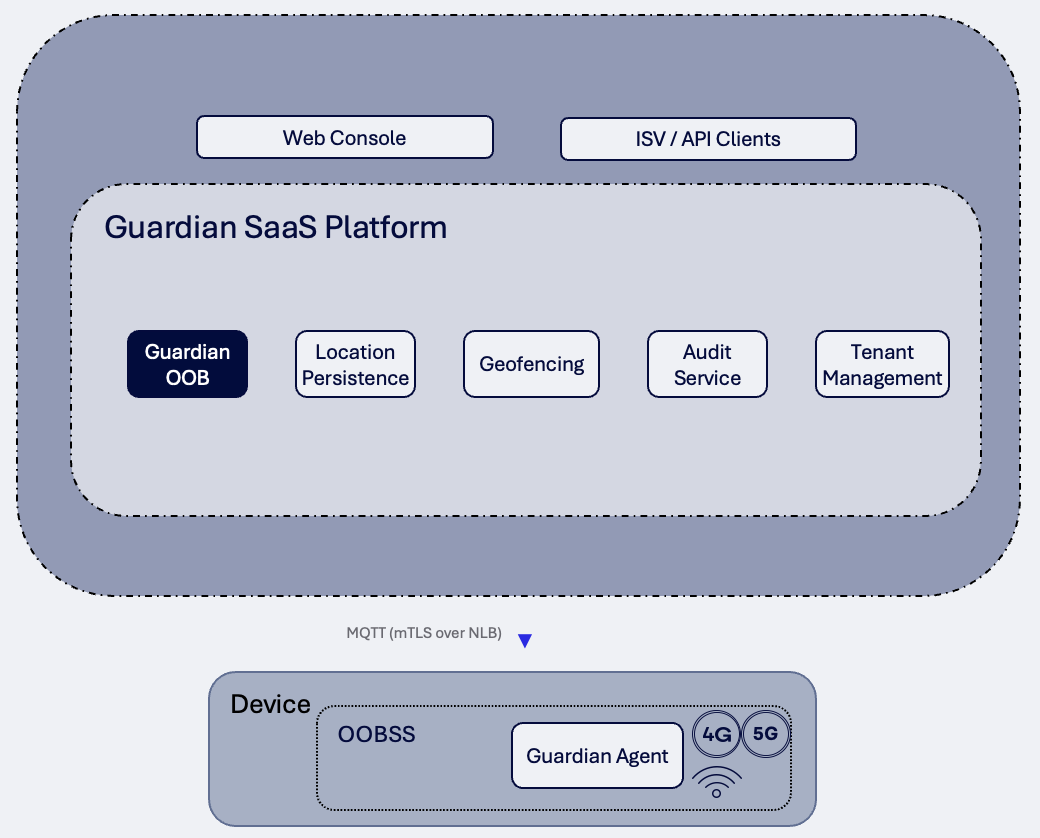
Quick Start: Common API Requests
- List Devices →
GET /devices - Search Devices →
GET /devices/search - Get Device Details →
GET /devices/{deviceId} - Send a Command →
POST /devices/{deviceId}/command/{type} - Get Command Status →
GET /devices/{deviceId}/command/{sequenceNumber} - Get Command History →
GET /devices/{deviceId}/commands/history - List Events →
GET /events/v2 - Get Device Location →
GET /devices/{deviceId}/location - Manage Geofences →
GET /geofences - Manage Tenants →
GET /organizations/tenants - Manage Users →
GET /organizations/users
Endpoints
1. List Devices
Gets a paginated list of devices enrolled under your tenant.
Request:
GET /devices?pageNum=0&pageSize=2Response (200):
{
  "page": 0,
  "pageSize": 2,
  "total": 12,
  "results": [
    {
      "id": "eceb637f-821b-4bfd-9087-865d261155a7",
      "name": "Device_A",
      "serialNumber": "WVL25432705",
      "qwesId": "Device_A",
      "model": {
        "mcn": "testQdragonX",
        "manufacturer": "Qualcomm",
        "formFactor": "laptop"
      },
      "inventoryState": "ONBOARDED",
      "serviceState": "READY",
      "lastHeartbeatTime": "2026-04-28T17:43:01.617Z"
    },
    {
      "id": "3e3df1ba-afca-4312-abcd-bf6c55b64de7",
      "name": "QCOM-LVKLAN4NP4",
      "serialNumber": "WHS49747680",
      "qwesId": "DeviceId3",
      "model": {
        "mcn": "testQdragonX",
        "manufacturer": "Qualcomm",
        "formFactor": "desktop"
      },
      "inventoryState": "ONBOARDED",
      "serviceState": "READY",
      "lastHeartbeatTime": "2026-05-01T08:50:47.143Z"
    }
  ]
}
Get Unassigned Devices
Returns devices not yet assigned to any tenant. Useful for initial provisioning.
Request:
GET /devices/unassigned?pageNum=0&pageSize=102. Search Devices
Search devices using filter criteria within your tenant scope.
Request:
GET /devices/search?name=Device_A&pageNum=0&pageSize=10Response (200):
{
  "page": 0,
  "pageSize": 10,
  "total": 1,
  "results": [
    {
      "id": "eceb637f-821b-4bfd-9087-865d261155a7",
      "name": "Device_A",
      "serialNumber": "WVL25432705",
      "qwesId": "Device_A",
      "inventoryState": "ONBOARDED",
      "serviceState": "READY",
      "lastHeartbeatTime": "2026-04-28T17:43:01.617Z"
    }
  ]
}
3. Get Device Details
Retrieve full details for a specific device by its ID (QWES ID or UUID).
Request:
GET /devices/Device_AResponse (200):
{
  "id": "eceb637f-821b-4bfd-9087-865d261155a7",
  "name": "Device_A",
  "serialNumber": "WVL25432705",
  "qwesId": "Device_A",
  "publicKeyId": "0ce6be32-1984-4991-add4-f6888b44109b",
  "model": {
    "mcn": "testQdragonX",
    "mcnRevision": "TBD",
    "manufacturer": "Qualcomm",
    "formFactor": "laptop"
  },
  "configurations": [
    {
      "name": "operatingSystem",
      "value": "Windows 11 Enterprise",
      "category": "device"
    },
    {
      "name": "processorModel",
      "value": "Snapdragon X Elite",
      "category": "device"
    },
    {
      "name": "totalSystemMemoryGiB",
      "value": "32",
      "category": "device"
    }
  ],
  "inventoryState": "ONBOARDED",
  "serviceState": "READY",
  "lastHeartbeatTime": "2026-04-28T17:43:01.617Z",
  "metricsInfo": {
    "metrics": [
      {
        "name": "lockState",
        "value": "Unlocked",
        "lastUpdatedTime": "2026-04-28T17:43:01.617Z"
      },
      {
        "name": "powerState",
        "value": "On",
        "lastUpdatedTime": "2026-04-28T17:43:01.617Z"
      }
    ]
  }
}
Assign Device to Tenant
Request:
POST /devices/Device_A/assignUnassign Device from Tenant
Request:
DELETE /devices/Device_A/assign4. Send a Command
Send a command to a device. The response includes a sequenceNumber to track command progress.
Command Types
| Endpoint Suffix | Request Type | Description |
|---|---|---|
/command | Generic (specify requestType in body) | Generic command dispatch |
/command/location | LOCATION | Request current device location |
/command/systemInfo | SYSTEM_INFO | Get system information |
/command/memoryInfo | MEMORY_INFO | Get memory details |
/command/chasisInfo | CHASSIS_INFO | Get chassis/hardware details |
/command/softwareInfo | SOFTWARE_INFO | Get installed software list |
/command/registry | REGISTRY | Query device registry |
/command/firmware | FIRMWARE | Get firmware version info |
/command/bios | BIOS | Get BIOS details |
/command/reset | RESET | Reset the device |
/command/secureErase | SECURE_ERASE | Securely erase device data |
/command/lock | LOCK | Lock the device |
/command/reimage | REIMAGE | Reimage the device |
/command/taskStatus | TASK_STATUS | Get running task status |
/command/opaque | OPAQUE | Send opaque command (custom payload) |
/command/unenroll | UNENROLL | Unenroll device from platform |
/command/logFile | LOG_FILE | Request device log file |
Example: Request Location
Request:
POST /devices/Device_A/command/locationResponse (200):
{
  "deviceId": "Device_A",
  "sequenceNumber": 8042,
  "requestType": "LOCATION",
  "requestStatus": "PENDING",
  "message": "Command to perform LOCATION initiated.",
  "createdAt": "2026-05-07T01:05:44.249Z"
}
Example: System Info
Request:
POST /devices/Device_A/command/systemInfoResponse (200):
{
  "deviceId": "Device_A",
  "sequenceNumber": 8043,
  "requestType": "SYSTEM_INFO",
  "requestStatus": "PENDING",
  "message": "Command to perform SYSTEM_INFO initiated.",
  "createdAt": "2026-05-07T01:06:12.103Z"
}
Example: Secure Erase
Request:
POST /devices/Device_A/command/secureErase
Content-Type: application/json

{
  "eraseType": "FULL",
  "confirmationCode": "ERASE-CONFIRM-7X9K"
}
Response (200):
{
  "deviceId": "Device_A",
  "sequenceNumber": 8044,
  "requestType": "SECURE_ERASE",
  "requestStatus": "PENDING",
  "message": "Command to perform SECURE_ERASE initiated.",
  "createdAt": "2026-05-07T01:07:30.891Z"
}
Example: Lock Device
Request:
POST /devices/Device_A/command/lock
Content-Type: application/json

{
  "lockMessage": "This device has been locked by your administrator."
}
Response (200):
{
  "deviceId": "Device_A",
  "sequenceNumber": 8045,
  "requestType": "LOCK",
  "requestStatus": "PENDING",
  "message": "Command to perform LOCK initiated.",
  "createdAt": "2026-05-07T01:08:05.220Z"
}
Example: Generic Command
Request:
POST /devices/Device_A/command
Content-Type: application/json

{
  "requestType": "MEMORY_INFO"
}
5. Get Command Status
Retrieve the current status of a command by its sequence number. When status is COMPLETE, the resultBody contains the command output.
Request:
GET /devices/Device_A/command/8042Response (200) — Pending:
{
  "commandId": "a1b2c3d4-e5f6-7890-abcd-ef1234567890",
  "sequenceNumber": 8042,
  "deviceId": "Device_A",
  "requestType": "LOCATION",
  "currentStatus": "PENDING",
  "initiatedAt": "2026-05-07T01:05:44.249Z",
  "completedAt": null,
  "transitions": [
    {
      "fromStatus": null,
      "toStatus": "PENDING",
      "occurredAt": "2026-05-07T01:05:44.249Z"
    }
  ]
}
Response (200) — Complete:
{
  "commandId": "a1b2c3d4-e5f6-7890-abcd-ef1234567890",
  "sequenceNumber": 8042,
  "deviceId": "Device_A",
  "requestType": "LOCATION",
  "currentStatus": "COMPLETE",
  "resultBody": {
    "location": {
      "lat": 32.899292,
      "lng": -117.191772
    },
    "accuracy": 15,
    "source": "gps",
    "streetAddress": {
      "addressLine": "10001 Pacific Mesa Blvd",
      "metro1": "San Diego",
      "postalCode": "92121",
      "stateCode": "CA",
      "countryCode": "US"
    }
  },
  "initiatedAt": "2026-05-07T01:05:44.249Z",
  "completedAt": "2026-05-07T01:05:47.812Z",
  "transitions": [
    {
      "fromStatus": null,
      "toStatus": "PENDING",
      "occurredAt": "2026-05-07T01:05:44.249Z"
    },
    {
      "fromStatus": "PENDING",
      "toStatus": "RUNNING",
      "occurredAt": "2026-05-07T01:05:45.100Z"
    },
    {
      "fromStatus": "RUNNING",
      "toStatus": "COMPLETE",
      "occurredAt": "2026-05-07T01:05:47.812Z"
    }
  ]
}
Command Status Values:
| Status | Description |
|---|---|
PENDING | Command accepted, waiting for device |
RUNNING | Device acknowledged and is processing |
COMPLETE | Command finished successfully — see resultBody |
FAILED | Command failed — see resultBody for error details |
TIMEOUT | Device did not respond within the timeout window |
6. Get Command History
Retrieve the history of all commands sent to a device.
Request:
GET /devices/Device_A/commands/history?pageNum=0&pageSize=5Response (200):
{
  "page": 0,
  "pageSize": 5,
  "total": 42,
  "results": [
    {
      "commandId": "a1b2c3d4-e5f6-7890-abcd-ef1234567890",
      "sequenceNumber": 8042,
      "deviceId": "Device_A",
      "requestType": "LOCATION",
      "currentStatus": "COMPLETE",
      "initiatedAt": "2026-05-07T01:05:44.249Z",
      "completedAt": "2026-05-07T01:05:47.812Z"
    },
    {
      "commandId": "b2c3d4e5-f6a7-8901-bcde-f12345678901",
      "sequenceNumber": 8041,
      "deviceId": "Device_A",
      "requestType": "SYSTEM_INFO",
      "currentStatus": "COMPLETE",
      "initiatedAt": "2026-05-06T22:14:10.003Z",
      "completedAt": "2026-05-06T22:14:13.441Z"
    }
  ]
}
Get Specific History Entry
Request:
GET /devices/Device_A/commands/history/80427. List Events
Retrieve device events scoped to your tenant. Two versions are available:
GET /events— Proxied from QRMS (legacy)GET /events/v2— SaaS-native with full pagination and sorting (recommended)
Request:
GET /events/v2?page=0&size=10&sort=occurredAt,descResponse (200):
{
  "page": 0,
  "pageSize": 10,
  "total": 156,
  "results": [
    {
      "eventId": "f47ac10b-58cc-4372-a567-0e02b2c3d479",
      "deviceId": "Device_A",
      "tenantId": "550e8400-e29b-41d4-a716-446655440000",
      "messageType": "SensorEvent.1.0.ReadingAboveUpperCriticalThreshold",
      "severity": "Critical",
      "category": "Sensor",
      "payload": {
        "sensorName": "CPU Temperature",
        "reading": 95.2,
        "threshold": 90.0,
        "unit": "Celsius"
      },
      "status": "UNREAD",
      "occurredAt": "2026-05-07T00:45:12.331Z"
    },
    {
      "eventId": "6ba7b810-9dad-11d1-80b4-00c04fd430c8",
      "deviceId": "Device_A",
      "tenantId": "550e8400-e29b-41d4-a716-446655440000",
      "messageType": "GeofenceViolation.1.0.ExitBoundary",
      "severity": "Warning",
      "category": "Location",
      "payload": {
        "ruleId": "rule-001",
        "lastKnownLocation": { "lat": 33.01, "lng": -117.25 }
      },
      "status": "UNREAD",
      "occurredAt": "2026-05-06T23:30:05.112Z"
    }
  ]
}
Get Event by ID
Request:
GET /events/v2/f47ac10b-58cc-4372-a567-0e02b2c3d479Update Event Status
Mark an event as acknowledged or dismissed.
Request:
PATCH /events/f47ac10b-58cc-4372-a567-0e02b2c3d479
Content-Type: application/json

{
  "status": "ACKNOWLEDGED"
}
Response (200):
{
  "eventId": "f47ac10b-58cc-4372-a567-0e02b2c3d479",
  "deviceId": "Device_A",
  "messageType": "SensorEvent.1.0.ReadingAboveUpperCriticalThreshold",
  "severity": "Critical",
  "status": "ACKNOWLEDGED",
  "occurredAt": "2026-05-07T00:45:12.331Z"
}
Event Status Values:
| Status | Description |
|---|---|
UNREAD | New event, not yet reviewed |
ACKNOWLEDGED | Event reviewed and acknowledged by operator |
DISMISSED | Event dismissed (no action needed) |
Event Subscriptions
Manage event subscriptions for real-time notifications:
GET /events/subscriptions?deviceId=Device_A8. Get Device Location
Retrieve the last-known location or full location history for a device.
Last-Known Location
Request:
GET /devices/Device_A/locationResponse (200):
{
  "deviceId": "Device_A",
  "latitude": 32.899292,
  "longitude": -117.191772,
  "altitudeMeters": 15.0,
  "speedMps": 0.0,
  "bearing": 270.0,
  "accuracyMeters": 5.0,
  "source": "QRMS_COMMAND",
  "recordedAt": "2026-05-07T01:05:47.812Z"
}
Location History
Request:
GET /devices/Device_A/location/history?page=0&size=20&sort=recordedAt,descResponse (200):
{
  "page": 0,
  "pageSize": 20,
  "total": 87,
  "results": [
    {
      "deviceId": "Device_A",
      "latitude": 32.899292,
      "longitude": -117.191772,
      "altitudeMeters": 15.0,
      "speedMps": 0.0,
      "accuracyMeters": 5.0,
      "source": "QRMS_COMMAND",
      "recordedAt": "2026-05-07T01:05:47.812Z"
    },
    {
      "deviceId": "Device_A",
      "latitude": 32.897100,
      "longitude": -117.189500,
      "altitudeMeters": 18.2,
      "speedMps": 1.4,
      "accuracyMeters": 8.0,
      "source": "QRMS_COMMAND",
      "recordedAt": "2026-05-06T22:14:13.441Z"
    }
  ]
}
9. Manage Geofences
Create geographic boundary rules that trigger violations when devices enter or exit defined zones.
List Geofence Rules
Request:
GET /geofencesResponse (200):
[
  {
    "ruleId": "a1234567-89ab-cdef-0123-456789abcdef",
    "deviceId": "Device_A",
    "zone": {
      "type": "Polygon",
      "coordinates": [
        [[-117.20, 32.70], [-117.10, 32.70], [-117.10, 32.75], [-117.20, 32.75], [-117.20, 32.70]]
      ]
    },
    "violationType": "EXIT",
    "createdAt": "2026-04-15T10:30:00.000Z"
  }
]
Create Geofence Rule
Request:
POST /geofences
Content-Type: application/json

{
  "deviceId": "Device_A",
  "zone": {
    "type": "Polygon",
    "coordinates": [
      [[-117.20, 32.70], [-117.10, 32.70], [-117.10, 32.75], [-117.20, 32.75], [-117.20, 32.70]]
    ]
  },
  "violationType": "EXIT"
}
Response (201):
{
  "ruleId": "a1234567-89ab-cdef-0123-456789abcdef",
  "deviceId": "Device_A",
  "zone": {
    "type": "Polygon",
    "coordinates": [
      [[-117.20, 32.70], [-117.10, 32.70], [-117.10, 32.75], [-117.20, 32.75], [-117.20, 32.70]]
    ]
  },
  "violationType": "EXIT",
  "createdAt": "2026-05-07T10:30:00.000Z"
}
Violation Types:
| Type | Description |
|---|---|
ENTER | Triggers when device enters the zone |
EXIT | Triggers when device leaves the zone |
ENTER_OR_EXIT | Triggers on either boundary crossing |
Get Geofence Violations
Request:
GET /geofences/violations?page=0&size=10&sort=occurredAt,descResponse (200):
{
  "page": 0,
  "pageSize": 10,
  "total": 3,
  "results": [
    {
      "violationId": "v1234567-89ab-cdef-0123-456789abcdef",
      "ruleId": "a1234567-89ab-cdef-0123-456789abcdef",
      "deviceId": "Device_A",
      "occurredAt": "2026-05-06T23:30:05.112Z"
    }
  ]
}
Delete Geofence Rule
Request:
DELETE /geofences/a1234567-89ab-cdef-0123-456789abcdefResponse: 204 No Content
10. Manage Tenants
Multi-tenant organization management. Platform admin access required.
List Tenants
Request:
GET /organizations/tenantsResponse (200):
[
  {
    "tenantId": "550e8400-e29b-41d4-a716-446655440000",
    "name": "Acme Corp",
    "m2mClientId": "0oa5g2k7x9EXAMPLE",
    "parentTenantId": null,
    "createdAt": "2026-01-15T08:00:00.000Z",
    "updatedAt": "2026-04-20T14:30:00.000Z"
  },
  {
    "tenantId": "6ba7b810-9dad-11d1-80b4-00c04fd430c8",
    "name": "Globex Industries",
    "m2mClientId": "0oa7h3m9y1EXAMPLE",
    "parentTenantId": "550e8400-e29b-41d4-a716-446655440000",
    "createdAt": "2026-03-01T12:00:00.000Z",
    "updatedAt": "2026-03-01T12:00:00.000Z"
  }
]
Create Tenant
Request:
POST /organizations/tenants
Content-Type: application/json

{
  "name": "Acme Corp"
}
Response (201):
{
  "tenantId": "550e8400-e29b-41d4-a716-446655440000",
  "name": "Acme Corp",
  "m2mClientId": "0oa5g2k7x9EXAMPLE",
  "clientSecret": "cs_XXXXXXXXXXXXXXXXXXXXXXXXXXXXXXXX",
  "createdAt": "2026-05-07T08:00:00.000Z"
}
Important: The
clientSecretis returned only once during tenant creation. Store it securely — it cannot be retrieved again.
Update Tenant
Request:
PUT /organizations/tenants/550e8400-e29b-41d4-a716-446655440000
Content-Type: application/json

{
  "name": "Acme Corp (Updated)"
}
Delete Tenant
Soft-deletes a tenant. Data is retained for audit purposes.
Request:
DELETE /organizations/tenants/550e8400-e29b-41d4-a716-446655440000Response: 204 No Content
11. Manage Users
Manage users within your tenant. Users are bound to a single tenant and assigned a system role.
List Users
Request:
GET /organizations/usersResponse (200):
[
  {
    "userId": "d4735e3a-265e-16d6-a3e1-3fb8f12a1b2c",
    "email": "admin@acmecorp.com",
    "tenantId": "550e8400-e29b-41d4-a716-446655440000",
    "systemRole": "ADMIN",
    "createdAt": "2026-01-15T08:00:00.000Z",
    "updatedAt": "2026-01-15T08:00:00.000Z"
  },
  {
    "userId": "e8b764da-5296-4aac-b5b0-3e7f1c8d9a0b",
    "email": "operator@acmecorp.com",
    "tenantId": "550e8400-e29b-41d4-a716-446655440000",
    "systemRole": "OPERATOR",
    "createdAt": "2026-02-10T10:30:00.000Z",
    "updatedAt": "2026-04-01T09:00:00.000Z"
  }
]
Invite User
Creates an identity provider account and a platform user record.
Request:
POST /organizations/users/invite
Content-Type: application/json

{
  "email": "newuser@acmecorp.com",
  "role": "OPERATOR"
}
Response (201):
{
  "userId": "f5c8a1b2-3d4e-5f6a-7b8c-9d0e1f2a3b4c",
  "email": "newuser@acmecorp.com",
  "tenantId": "550e8400-e29b-41d4-a716-446655440000",
  "systemRole": "OPERATOR",
  "createdAt": "2026-05-07T11:00:00.000Z",
  "updatedAt": "2026-05-07T11:00:00.000Z"
}
Update User Role
Request:
PUT /organizations/users/e8b764da-5296-4aac-b5b0-3e7f1c8d9a0b
Content-Type: application/json

{
  "role": "ADMIN"
}
Remove User
Request:
DELETE /organizations/users/e8b764da-5296-4aac-b5b0-3e7f1c8d9a0bResponse: 204 No Content
System Roles:
| Role | Permissions |
|---|---|
ADMIN | Full access — manage users, devices, and all platform features |
OPERATOR | Device commands, event management, location and geofence access |
VIEWER | Read-only access to all resources |
Device Event Subscriptions
Manage real-time event subscriptions on individual devices for push-based alerting.
Subscribe to Device Events
Request:
POST /devices/Device_A/command/event/subscribe
Content-Type: application/json

{
  "eventTypes": ["SensorEvent", "GeofenceViolation"],
  "callbackUrl": "https://your-webhook.example.com/events"
}
Unsubscribe from Device Events
Request:
POST /devices/Device_A/command/event/unsubscribe/{eventId}Get Device Event Subscriptions
Request:
POST /devices/Device_A/command/event/getSubscriptionsGet Device Event Logs
Request:
POST /devices/Device_A/command/event/getLogsClear Device Event Logs
Request:
POST /devices/Device_A/command/event/clearLogsBoot Log Service
Manage boot-level log collection on devices.
Request Log File
Request:
POST /devices/Device_A/command/logFileStart Boot Log Service
Request:
POST /devices/Device_A/command/boot/logServiceGet Boot Log Service Status
Request:
POST /devices/Device_A/command/boot/getLogServiceStatusGet Boot Logs
Request:
POST /devices/Device_A/command/boot/getLogsDownload Log File
Retrieve the binary log file for a completed log command.
Request:
GET /devices/Device_A/logsFile/8050Response: Binary file download (application/octet-stream)
Pagination
All list endpoints support pagination via query parameters:
| Parameter | Default | Description |
|---|---|---|
page or pageNum | 0 | Zero-based page index |
size or pageSize | 20 | Items per page (max 200) |
sort | varies | Sort expression, e.g. occurredAt,desc |
Paginated responses include metadata:
{
  "page": 0,
  "pageSize": 20,
  "total": 156,
  "results": [...]
}
Error Handling
All error responses follow a consistent format:
{
  "status": 404,
  "message": "Device not found: DEVICE-XYZ",
  "timestamp": "2026-05-07T01:10:00.000Z"
}
Common HTTP Status Codes:
| Code | Meaning |
|---|---|
200 | Success |
201 | Resource created |
204 | Success, no content (deletes) |
400 | Validation error — check request body |
401 | Missing or invalid JWT token |
403 | Insufficient permissions for this resource |
404 | Resource not found |
429 | Rate limit exceeded — retry after backoff |
500 | Internal server error |
Authentication
The Compute Sentra API uses OAuth2 Bearer tokens.
For interactive users: Obtain a JWT from the configured identity provider (Okta) using the authorization code flow.
For machine-to-machine access: Use the OAuth2 client credentials flow with the m2mClientId and clientSecret provisioned during tenant creation.
POST /oauth2/token
Content-Type: application/x-www-form-urlencoded

grant_type=client_credentials&client_id=0oa5g2k7x9EXAMPLE&client_secret=cs_XXXXXXXX&scope=sentra.api
Include the resulting token in all API requests:
Authorization: Bearer eyJhbGciOiJSUzI1NiIs...Tokens include a tenant_id claim used for automatic resource scoping. No X-Tenant-ID header is required when using JWT authentication.